
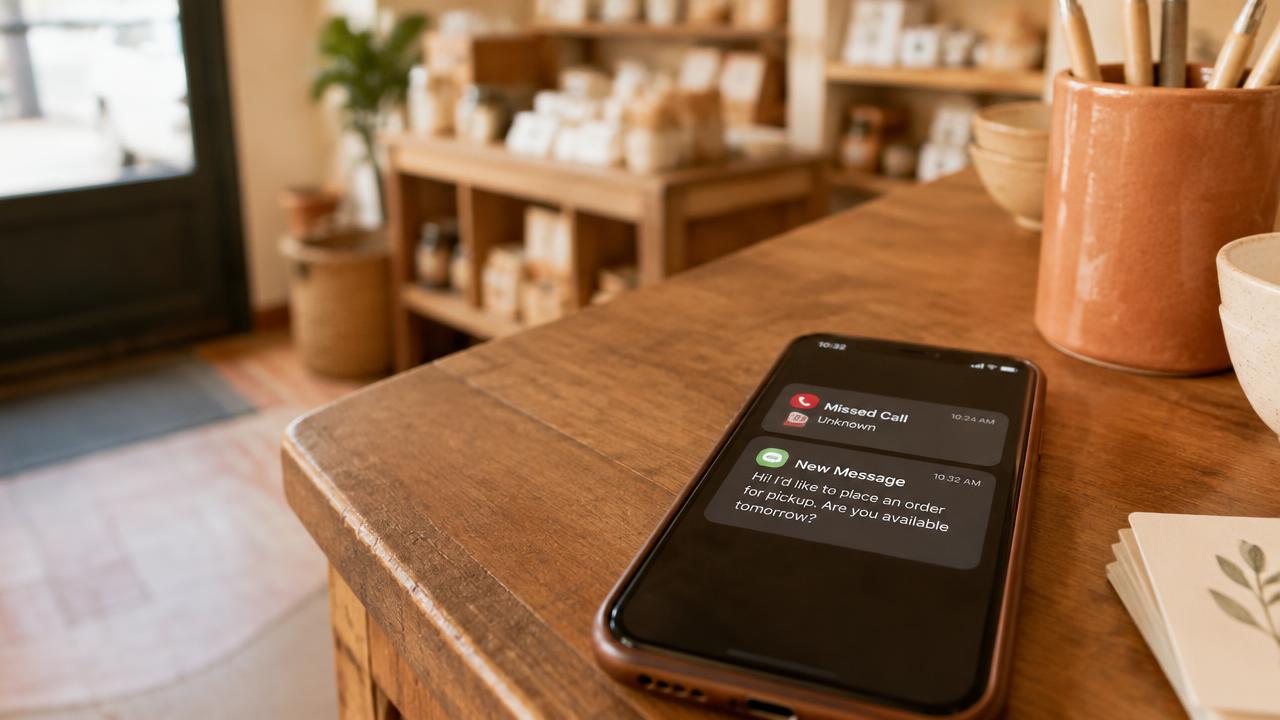
In today's fast-paced digital economy, an unanswered phone call is significantly more than just a minor inconvenience: it is a directly lost revenue opportunity. For small business owners across Canada, staying on top of the phone while managing complex day-to-day operations is a constant uphill battle. Whether you are in an important meeting, out on a remote job site, or helping another client in person, calls will inevitably go to voicemail at some point. The problem is that most modern consumers now refuse to leave a message. Instead, they simply hang up and immediately call the next business on their Google search results page. This is exactly where missed call text back automation changes the game for your business. By instantly sending a personalized text message to anyone who calls and does not get an answer, you acknowledge their needs right away and keep the conversation alive. This comprehensive guide will show you exactly how to implement this powerful technology to rescue your revenue, enhance your professional image, and improve your overall customer service experience using the Alloia platform.
Why Modern Customers Reject Voicemail
Consumer behavior has undergone a massive transformation over the last decade. In the past, leaving a message on an answering machine was the standard procedure for anyone trying to reach a business after hours or during a busy period. Today, voicemail is increasingly viewed as a tedious chore that offers no guarantee of a timely response. Industry observations consistently show that over 70% of first-time callers will hang up without leaving a message the moment they hear a voicemail greeting. The reason is simple: the process is asynchronous and creates uncertainty. The customer doesn't know when you will listen to the message, or if you will ever call them back. In an era of instant gratification, this delay is often a deal-breaker.
In contrast, SMS (text messaging) offers a nearly immediate two-way communication channel. By sending an automated text message the second a call is missed, you show the customer that their inquiry has been recognized and that you genuinely value their time. This humanizes your business even when you are physically unavailable to pick up the phone. Instead of moving on to the next competitor in the Google search results, the customer stops, reads your message, and frequently responds with details about their request. It is the ultimate tool for real-time lead capture.
The shift from voice to text is particularly pronounced among younger generations, but it has now expanded to all age groups across Canada. Texting is less intrusive than a phone call and allows for multi-tasking. A client can text you while in a meeting, on public transit, or in a quiet environment where a voice call is simply not possible. For your small business, this ensures that a sales lead never goes cold. It is also a matter of professional image: a company that responds via SMS appears modern, agile, and deeply committed to customer service.
Consider your own behavior as a consumer. If you are looking for an emergency plumber and the first one doesn't answer, do you leave a message and wait three hours for a callback, or do you call the next name on the list? The answer is clear. Missed call text back automation breaks this cycle by engaging the customer before they even have a chance to hit the 'back' button on their browser. It creates a powerful psychological anchor that secures the business opportunity for you.
How It Works: From Call Forwarding to the Inbox
The Alloia solution is built on robust technology designed to be completely transparent and simple for the business owner. It all starts with 'Conditional Call Forwarding'. Unlike traditional call forwarding which redirects every single incoming call, conditional forwarding only triggers in specific scenarios: if your line is busy, if you don't answer after a set number of rings, or if your phone is turned off or out of range. This is a standard feature provided by virtually all Canadian telecom carriers, including Bell, Telus, Rogers, and Shaw.
Your public business number, whether it is a traditional landline or a mobile phone, is configured to redirect these missed calls to a dedicated Twilio number provided by Alloia. As soon as the call hits this special number and goes unanswered, the system instantly identifies the caller's ID. If the number is a mobile line capable of receiving texts (which covers the vast majority of mobile lines today), Alloia triggers the delivery of the message you have pre-written in your dashboard.
This automated message is sent from your professional Twilio number, ensuring brand consistency and a clear separation between your personal calls and business communications. It is important to note that Alloia does not use robotic voice AI to talk to your customers. We believe that text is more efficient, faster, and less frustrating for a caller than a bot trying to simulate human speech. Texting is direct, concrete, and highly effective.
When the customer replies to your automated text, their message arrives directly in your Alloia inbox. You receive a notification, and you can then take over the conversation manually from any internet-connected device. This seamless transition from automation to human interaction is the secret to success. The technical simplicity of the system ensures a maximum delivery rate and rock-solid reliability without requiring expensive hardware or complex on-site installations.
12 Essential Text Templates for Various Industries
The content of your message is the most critical element of your strategy. It must be professional, concise, and provide a clear next step. Here are twelve templates tailored for different business scenarios in the Canadian market that you can copy and adapt within your Alloia interface.
1. Standard Business Hours: Hi! Thanks for calling [Business Name]. We are currently on the other line with a client. How can we help you today? You can also book a time slot here: {{lien}}
2. After-Hours / Evening: Hello! You have reached [Business Name]. Our office is currently closed, but we saw your call. Feel free to leave a message here or book your next appointment online: {{lien}}
3. Contractor / Construction: Hi, this is [Name]. I'm currently on a job site and can't pick up the phone. What project or address are you calling about? I'll text you back as soon as I have a break.
4. Medical or Dental Clinic: Hello, you have reached [Clinic Name]. We are currently assisting patients. For quick booking or minor inquiries, please use our patient portal: {{lien}}
5. Hair Salon or Spa: Hi there! We're busy pampering a client right now. To check our real-time availability and book your spot, click here: {{lien}}. See you soon!
6. Restaurant / Reservations: Hello from [Restaurant Name]! We are currently in the middle of our dinner rush. To book a table for tonight or tomorrow, please use this link: {{lien}}. Enjoy your meal!
7. Auto Repair / Garage: Hi! It's [Garage Name]. We've got our hands full in the shop! Briefly describe your vehicle's issue here and we'll get back to you with an estimate or a time slot shortly.
8. Emergency Service (Plumbing, Locksmith): Hello, we received your emergency call. We are already out on a dispatch. Please text your exact address and a description of the problem now for priority service.
9. Weekend / Holiday Message: Happy Sunday! [Business Name] is closed until Monday morning. For any non-urgent inquiries, please leave a message here. We will handle it first thing when we return.
10. Real Estate Agent: Hi! You've reached [Name]. I am currently showing a property to a client. Which listing are you interested in? Send me the address and I'll text you the feature sheet right away.
11. Retail Boutique: Hello! Our team is busy helping customers in the store. Do you have a question about a product or our current stock? Ask here and we'll check for you as soon as possible.
12. Professional Services Agency: Hello, you've reached [Agency Name]. we are currently in a brainstorming session. For administrative questions or new inquiries, you can also book a call here: {{lien}}
The use of the {{lien}} tag is a massive advantage. It allows you to integrate your own external booking link, whether you use Calendly, Jane, Square, or any other tool. This fully automates the conversion cycle without any initial manual intervention required on your part.
Character Limits and Managing Your Monthly Credits
Understanding the technical side of SMS messaging is vital for any small business owner looking to optimize costs. An SMS message is composed of 'segments'. The standard limit for one segment is 160 characters when using the GSM-7 character set. This includes basic Latin letters, numbers, and common punctuation marks.
However, if your message includes special characters, symbols, or certain accents, the system must switch to a more complex encoding called UCS-2. This switch reduces the limit of a single segment to only 70 characters. This is a global technical constraint of mobile networks and is not specific to Alloia, but it does impact how your monthly credits are consumed.
Why does this matter for your budget? Because your Alloia plan includes a specific number of credits per month (350 for the Starter plan at $49, 800 for Pro at $129, and 1,500 for Business at $299). If your automated message is 150 characters long but contains a single special character, it will be split into 3 segments (150 / 70 = 2.14, rounded up to 3). This means one missed call uses 3 credits instead of one. Over a high volume of calls, this can add up.
To get the best value from your plan, we recommend keeping your messages lean and focused. While professional spelling and grammar are essential, you can often rephrase your message to stay under the 70 or 140-character thresholds. Alloia helps you by providing a real-time character counter in the message configuration tool. Remember, a short and punchy message is often more effective on a customer's lock screen anyway.
Legal Compliance in Canada: CASL and A2P 10DLC
Sending commercial text messages in Canada is governed by the Canadian Anti-Spam Legislation (CASL). It is critical for your business to remain compliant to avoid penalties and protect your professional reputation. Fortunately, the service provided by Alloia fits naturally into a transactional and customer service context. The customer initiated the contact by calling your number, which creates a form of implied consent for an immediate and relevant response to their inquiry.
However, compliance involves more than just responding to an inquiry. Every message you send must offer a clear way for the recipient to opt-out of future communications. Alloia handles this automatically and transparently. If a customer replies with the keyword STOP, our system immediately blocks any future messages to that number, in accordance with industry standards. The HELP keyword is also supported to provide basic assistance information to the user.
Another critical area involves messaging to US-based phone numbers. If you have customers in the United States, you must be aware of A2P 10DLC (Application-to-Person 10-Digit Long Code) regulations. US carriers now require businesses to register to prove their legitimacy. This measure is designed to drastically reduce mass spam. Alloia assists you with these administrative steps to ensure that your texts are not blocked by the spam filters of major North American carriers.
Finally, always be transparent with your customers. It is a good practice to mention that standard message and data rates may apply depending on their mobile plan. While most modern plans include unlimited texting, this transparency is appreciated and builds trust. By following these guidelines, you use SMS not as an intrusive tool, but as a high-end customer service channel that respects both the law and the customer's privacy.
Setting the Right Tone and Handling Conversations
The tone you use in your SMS messages is a direct reflection of your brand identity. For a Canadian small business, finding the right balance between friendliness and professionalism is key. At Alloia, we generally recommend using professional language for the initial automated contact. It establishes a respectful distance while remaining welcoming and helpful. You want to sound like a capable professional, not an automated bot.
Be warm, but get straight to the point. Avoid excessive slang or 'text-speak' that could undermine your credibility. A well-punctuated message without spelling errors says a lot about your attention to detail. Remember that for a new prospect, this SMS might be their very first written interaction with your brand. First impressions matter immensely in the digital space.
The real power of Alloia lies in the centralized inbox. Once a customer replies to your automated text, the interaction should become human. If a customer asks a specific question about pricing or service availability, try to respond quickly. 'Speed to lead' is one of the most significant factors in a modern consumer's buying decision. A customer who receives a personalized response within minutes of their missed call is far more likely to convert.
Managing customer conversations via text also offers better internal organization for your team. Unlike phone calls that require your total and immediate attention, SMS can be handled in batches during quieter moments of your day. This flexibility is invaluable for small business owners who are constantly juggling multiple responsibilities and can't always stop what they're doing to answer a ringing phone.
Common Mistakes You Must Avoid
One of the most frequent mistakes businesses make when starting with automated SMS is being too wordy. An SMS is not an email. If the recipient has to scroll through several screens to read your message, you've already lost them. Brevity is your best friend. Another pitfall is the lack of a clear call to action. Don't just say 'Sorry we missed you'; tell them exactly what to do next. Always provide an alternative, ideally your {{lien}} booking link.
You should also avoid using this channel for aggressive promotional campaigns or SMS newsletters without separate, explicit consent. Missed call text back must remain a transactional response. Using it for unsolicited marketing can annoy your customers and lead to your number being blacklisted by telecommunications carriers, which can be difficult and costly to reverse.
A tactical mistake to watch out for is setting your call forwarding delay for too long. If you let your phone ring six or seven times before the forward triggers, the customer will likely have hung up in frustration already. We recommend setting the forward after three or four rings at most. This gives you enough time to answer if you are free, while ensuring a fast follow-up if you are not.
Finally, do not neglect the follow-up. If you automate the initial text but never check your Alloia inbox for customer replies, you are creating a poor user experience. Automation should be the start of a dialogue, not a replacement for it. Technology makes the initial connection easier, but your personal expertise and service are what ultimately close the sale and build long-term loyalty.
Measuring the ROI of Your SMS Strategy
How do you know if your Alloia subscription is a good investment for your business? It's essential to track key performance indicators (KPIs). The first is the volume of missed calls converted into conversations. In your dashboard, you can see exactly how many messages were sent and, more importantly, how many customers replied. A high reply rate is a strong signal that your message is relevant and engaging.
The second KPI is the direct conversion rate through your booking link. If you use tools like Calendly or Jane, you can usually track the source of your appointments. By seeing how many bookings came from the link in your SMS, you can calculate the exact revenue generated by Alloia. For many of our clients, just one or two 'rescued' sales per month more than cover the cost of the entire annual subscription.
Don't forget the intangible but vital benefits: improved brand image and higher customer satisfaction. A customer who feels heard and taken care of immediately, even by an automated message, is much more likely to leave a positive Google review or recommend you to others. In the competitive Canadian market, this digital reputation is a fundamental driver of growth and sustainability.
Finally, analyze the times of day or days of the week when you miss the most calls. This data can provide valuable insights into your staffing needs or help you adjust your business hours. Missed call text back is not just a sales tool; it's also a business intelligence tool that highlights the moments when your human capacity for answering the phone is being outpaced by market demand.
Frequently Asked Questions (FAQ) About SMS Automation
1. Do I need to switch my phone provider to use Alloia? No. Alloia works with any current provider (Bell, Rogers, Telus, etc.) using the conditional call forwarding feature that is already included in most business plans. You keep your current provider and your current number.
2. Will my customers see my personal number or Alloia's number? Texts are sent from a dedicated Twilio number that we set up for you. However, the transition is seamless for the customer since they just tried to call your business. You can include your name or business name in the message for total clarity.
3. Does the service work for calls from landlines? Yes, the system receives calls from any type of phone. If the caller is using a traditional landline, they obviously won't be able to receive the SMS, but the call will still be handled by your regular voicemail if you have one set up.
4. Can I customize the message based on the day or time? Absolutely. The Alloia interface allows you to set different automated responses for your regular business hours, evenings, and weekends, ensuring your communication is always contextually relevant to the caller.
5. What is the advantage over a traditional voicemail? Voicemail is a one-way, passive communication. SMS is interactive and active. It allows the customer to take immediate action, like booking an appointment, rather than waiting for an uncertain callback.
6. Is my customers' data secure? Yes, Alloia takes security very seriously. All communications are encrypted, and we follow industry best practices for privacy and compliance with Canadian telecommunications laws and regulations.
7. Can I send photos to my customers via SMS? Yes, with our Pro and Business plans, you can send and receive multimedia files (MMS). This is perfect for sending quotes, photos of completed work, or service documentation directly to the customer's phone.
8. Can I cancel the service at any time? Our plans are flexible and do not require long-term contracts, allowing you to adjust or cancel your plan as your business needs change over time.
A Checklist for Peak Performance Setup
To ensure you don't miss a single step and get the most out of your automated follow-ups, follow this practical checklist.
1. Confirm with your current phone provider that 'Conditional Call Forwarding' is active on your line.
2. Select a local or memorable Twilio number within your Alloia dashboard.
3. Draft your greeting message while staying under the 140-character limit to optimize credit usage.
4. Always include the {{lien}} tag to link to your booking tool or website.
5. Perform a live test: call your number from a different phone and confirm you receive the text back.
6. Enable notifications on your mobile device so you never miss a customer's reply.
7. Build a daily routine for checking and responding to text conversations in your Alloia inbox.
8. Periodically review and update your message templates to stay relevant with seasons or new promotions.